Per app · per day · three personas
How much data for a Japan trip?
Most people buy too much or too little. This page works out the number from what you will actually open, including the two apps that cost more in Japan than anywhere else.
The quick answer by trip length hotel wifi assumed
| Trip style | 5 days | 10 days | 14 days | 30 days |
|---|---|---|---|---|
| Maps, LINE, train apps, translation | 1GB | 2GB | 3GB | 6GB |
| Plus photos, stories, some video | 3.5GB | 7GB | 10GB | 20GB |
| Plus laptop hotspot and calls | 8GB | 16GB | 22GB | 48GB |
| Sizes that fit | Airalo 5GB | GigSky 10GB | Airalo 20GB | Yesim 30GB |
Assumes wifi at your accommodation most nights and offline maps downloaded before you leave home. The rows are cumulative: the middle row includes everything in the top row. If you are choosing between two sizes, take the larger one, because a plan that runs out at 21:00 in a station you do not know costs more in stress than the two dollars it saved.
What each app actually costs you per hour of real use
| What you are doing | Roughly | Notes |
|---|---|---|
| Google Maps, walking navigation | ≈5MB / hour | Almost free. Download the offline area before you fly and it approaches zero. |
| LINE and WhatsApp messages | ≈2MB / hour | Text is nothing. Voice notes and photo sends are the cost. |
| Japan Transit Planner, train apps | ≈10MB / hour | Light per query, and you will make a lot of queries. Budget more on disruption days. |
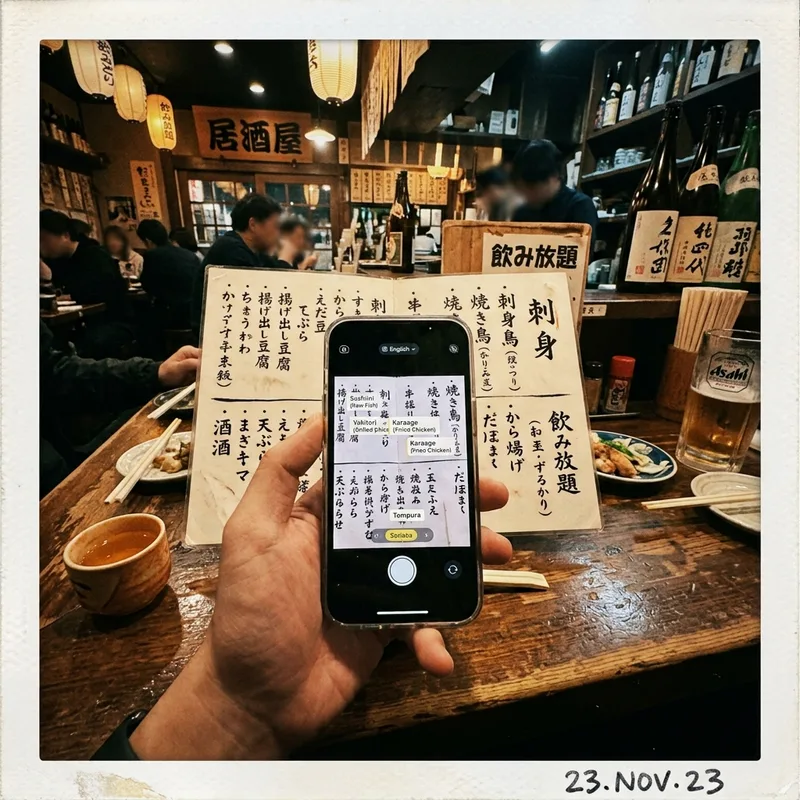
| Google Translate, camera mode | ≈50–100MB / hour | The Japan-specific cost. Live camera translation of menus and signs is heavy and you will use it daily. |
| Instagram or TikTok, scrolling | ≈500MB–1GB / hour | The single biggest line item for most travelers, by a distance. |
| Uploading photos to cloud backup | ≈3–5MB per photo | Turn cellular backup off. A day of shooting is easily a gigabyte on its own. |
| Video call, WhatsApp or FaceTime | ≈600MB / hour | The evening call home is a real budget item on a two-week trip. |
| Streaming video, 720p | ≈1GB / hour | More at 1080p. This is what unlimited plans exist for. |
| Spotify or podcasts | ≈70–150MB / hour | Download playlists on hotel wifi and this disappears. |
| Tethering a laptop, working day | ≈2–3GB / day | Video calls, cloud documents and a browser with forty tabs. This is the unlimited case. |
Approximations at the quality settings phones default to on cellular. Your numbers will vary, mostly with how much video you watch.
Three things that make Japan different and two of them cost you data
The translation camera is not optional. In most destinations you can muddle through a menu. In Japan, a small restaurant menu is often handwritten vertical Japanese with no pictures, and Google Translate's live camera mode is genuinely how you order. At 50 to 100MB an hour of active use, several times a day, that is a real line on the budget and nobody else's data guide mentions it.
Public wifi is technically everywhere and practically useless. Stations, convenience stores and cafes all advertise free wifi. Most of it wants an email registration per session, times out, and disconnects when you walk twenty metres. Do not plan around it. Hotel wifi is excellent and that is the one to rely on.
The train apps re-query constantly. Japanese rail is dense enough that a route has ten variants and a disruption changes all of them. On a day when the Yamanote line stops, you will refresh a transit app more times than you refresh anything else, and each refresh is a live query.
What pushes the other way: you will spend more of your day on trains and in hotels with wifi than in most countries, and Japan is walkable enough that map use is shorter than you expect.
Three travelers, three real numbers pick the one that sounds like you
Offline maps downloaded, photos backing up on hotel wifi only, a WhatsApp call home every second evening, no scrolling on the train. Maps, LINE, transit and translation come to about 250MB a day. Buy 5GB: Airalo at $10.50 for 15 days, and you will come home with change.
All of the above, plus an hour of Instagram a day, stories going up as you shoot them, a couple of YouTube videos on the Shinkansen and photos backing up whenever. About 700MB a day. Buy 10GB: GigSky at $16.79, on Docomo, with room to spare.
A laptop tethered for four working days a week, video calls, cloud documents, plus everything the normal traveler does in the evenings. Two to three gigabytes a day before you have looked at your own phone. Buy unlimited: Saily's 15 days at $48.99 with a 5GB daily cap, and read the caps page first.
Most people are the middle one and most people buy the wrong size in both directions: 3GB for a trip that needs 10, or 30GB for a trip that needs 5.
See GigSky plans See Saily plans Compare every providerWhich plan to buy at each size cheapest first
| You need | Cheapest | Price | Runner-up |
|---|---|---|---|
| 1GB | GigSky | $2.99 / 7 days | Saily $3.99 / 7 days |
| 3GB | GigSky | $7.49 / 15 days | Saily $7.99 / 30 days |
| 5GB | Airalo | $10.00 / 7 days | Yesim $10.23 / 30 days |
| 10GB | GigSky | $16.79 / 30 days | Saily $17.99 / 30 days |
| 20GB | Airalo | $24.00 / 15 days | Saily $24.99 / 30 days |
| 30GB | Yesim | $38.35 / 30 days | nothing else sells 30GB for Japan |
Match the validity to your trip, not just the size. Airalo's 5GB is cheapest at seven days and Yesim's is cheapest at thirty, and those are different products for different trips. Prices checked September 4, 2026.
Five ways to use half as much none of them involve being careful
- Download the offline map of every city before you fly. Google Maps, Tokyo, Kyoto, Osaka and anywhere else on the route. Walking navigation then costs almost nothing, and it works in the subway.
- Turn off cellular photo backup. iCloud and Google Photos will happily upload four gigabytes of RAW files over a Japanese network. Settings, Photos, wifi only. This is the single biggest saving available.
- Download the translation language pack. Google Translate can hold Japanese offline, which cuts the camera mode's cost to near zero. Do it on hotel wifi on the first night.
- Download your playlists and podcasts on hotel wifi rather than streaming them on the train. Music streaming is the quietest way to lose a gigabyte a day.
- Cap the video, not the browsing. One hour less of scrolling video a day saves more than every other habit on this list combined. Everything except video is rounding error.
Japan data questions short answers
Is 20GB of data enough for 2 weeks in Japan?
Comfortably, yes. Two weeks of maps, LINE, train apps, translation, photo uploads and a couple of hours of video a day lands around 10 to 15GB. Twenty gigabytes leaves room to hotspot a laptop a few evenings. It is $24.00 from Airalo over fifteen days or $24.99 from Saily over thirty.
How much data do I need for a week in Japan?
About 3 to 5GB for normal sightseeing with hotel wifi at night. Airalo's 5GB at $10.00 for seven days or $10.50 for fifteen covers it. If you scroll social video for an hour or more a day, take 10GB instead: GigSky's is $16.79.
Is 5GB enough for Japan?
For a week of careful use, yes. For two weeks, only if you download offline maps, keep photo backup on wifi and do not scroll video on the train. Most two-week travelers use 7 to 12GB, so 10GB is the safer buy at about six dollars more.
Does Japan have free wifi for tourists?
Technically, in stations, convenience stores and cafes. Practically it is close to useless: most networks want an email registration for every session, time out quickly and drop as soon as you walk away. Hotel wifi is genuinely good. Do not plan your data budget around free wifi in Japan.
What uses the most data in Japan specifically?
Scrolling social video, at 500MB to 1GB an hour, the same as anywhere. The Japan-specific one is Google Translate's live camera mode, at 50 to 100MB an hour, which you will use several times a day on menus and signs and which no other data guide mentions. Downloading the Japanese language pack offline removes it entirely.
Two weeks? 10GB for $16.79
The size most Japan travelers actually need, at the cheapest price we can link, on NTT Docomo. If you will be tethering a laptop, read the unlimited caps page first and buy Saily instead.
See GigSky Japan plansSources & freshness: Per-app figures are approximations at the quality settings phones default to on cellular, cross-checked against published carrier estimates; your usage will vary, mostly with how much video you watch. Plan prices from esimdb and each brand's Japan page on September 4, 2026, in USD. The translation-camera and public-wifi observations are Japan-specific and drawn from traveler reports rather than a measurement of our own. How we test.